
Heated tobacco devices differ not only in their shape and stick format but also in the maintenance they require. Some devices have an accessible chamber or a delicate heating element, while others use a largely enclosed induction system. There is no single cleaning method that is suitable for every device.
The most important rule is to identify the exact model and read its manual first. Unsuitable tools, liquid inside the device or excessive force can damage heating elements, contacts and seals.
Heated tobacco products and tobacco sticks are not risk-free and may contain nicotine. This article deals only with technical cleaning and care. It is not a health recommendation.
Key points
- Switch the device off, disconnect the charging cable and allow it to cool completely.
- Identify the heating system before inserting any cleaning tool.
- Keep the inside dry unless the manufacturer explicitly permits another method.
- Do not use needles, knives, paper clips or other metal objects.
- Never scrape, bend or press a delicate heating element.
- Use liquid only on parts and surfaces explicitly approved by the manufacturer.
- Stop using a device that smells unusual, becomes very hot or has a damaged battery or bent component.
Why cleaning depends on the heating system
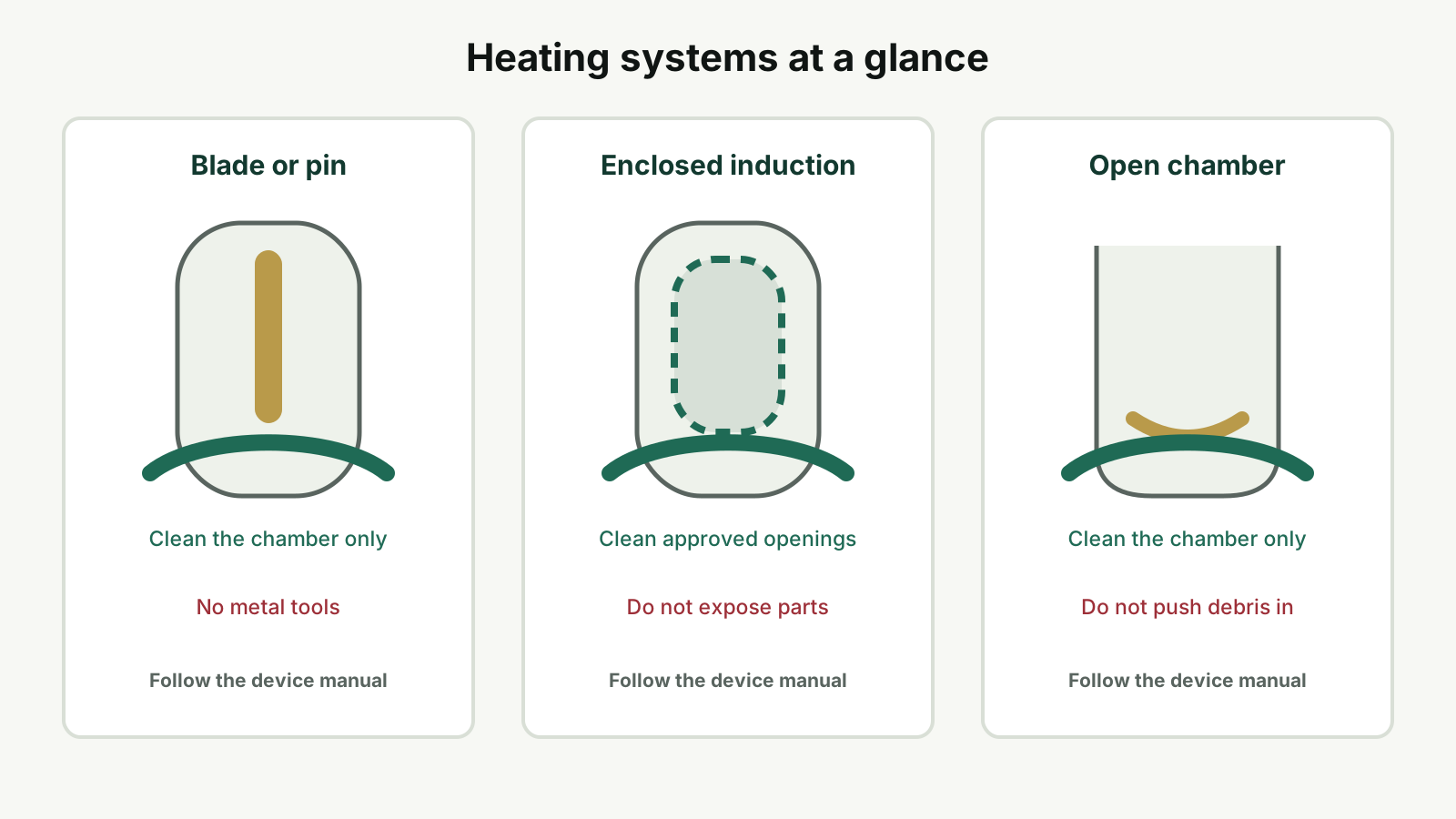
Many devices look similar from the outside, but their internal design can be very different. Three broad designs are particularly relevant for maintenance.
1. Devices with a heating blade or pin
These devices contain a thin heating element inside the chamber. The intended stick sits close to that element during use.
Small deposits can build up around the chamber or element. The component may also be delicate: a hard brush, sideways force or a metal object can damage it.
- Allow the device to cool completely
- Remove loose deposits carefully
- Use only suitable cleaning tools
- Do not push against the heating element
- Do not fill the chamber with liquid
2. Enclosed or blade-free induction systems
Blade-free systems transfer heat to the intended stick without an openly accessible blade. There may be no exposed element that needs to be brushed.
This does not make the whole device maintenance-free. The cap, mouthpiece area, casing, charging port and contact surfaces can still collect dust or dirt.
- Do not insert a brush deep into enclosed areas
- Do not try to expose a supposed heating blade
- Clean openings only as described in the manual
- Keep charging contacts dry
- Keep liquid away from gaps and ports
3. Devices with an accessible heating chamber
Some devices have a chamber in which dry residue can collect. A soft, correctly sized brush may be intended for that chamber.
- Shake out loose residue first
- Open the chamber only when cold
- Brush without strong pressure
- Do not push debris deeper into the device
- Check that the chamber is dry and free from loose material afterwards
Step-by-step cleaning guide
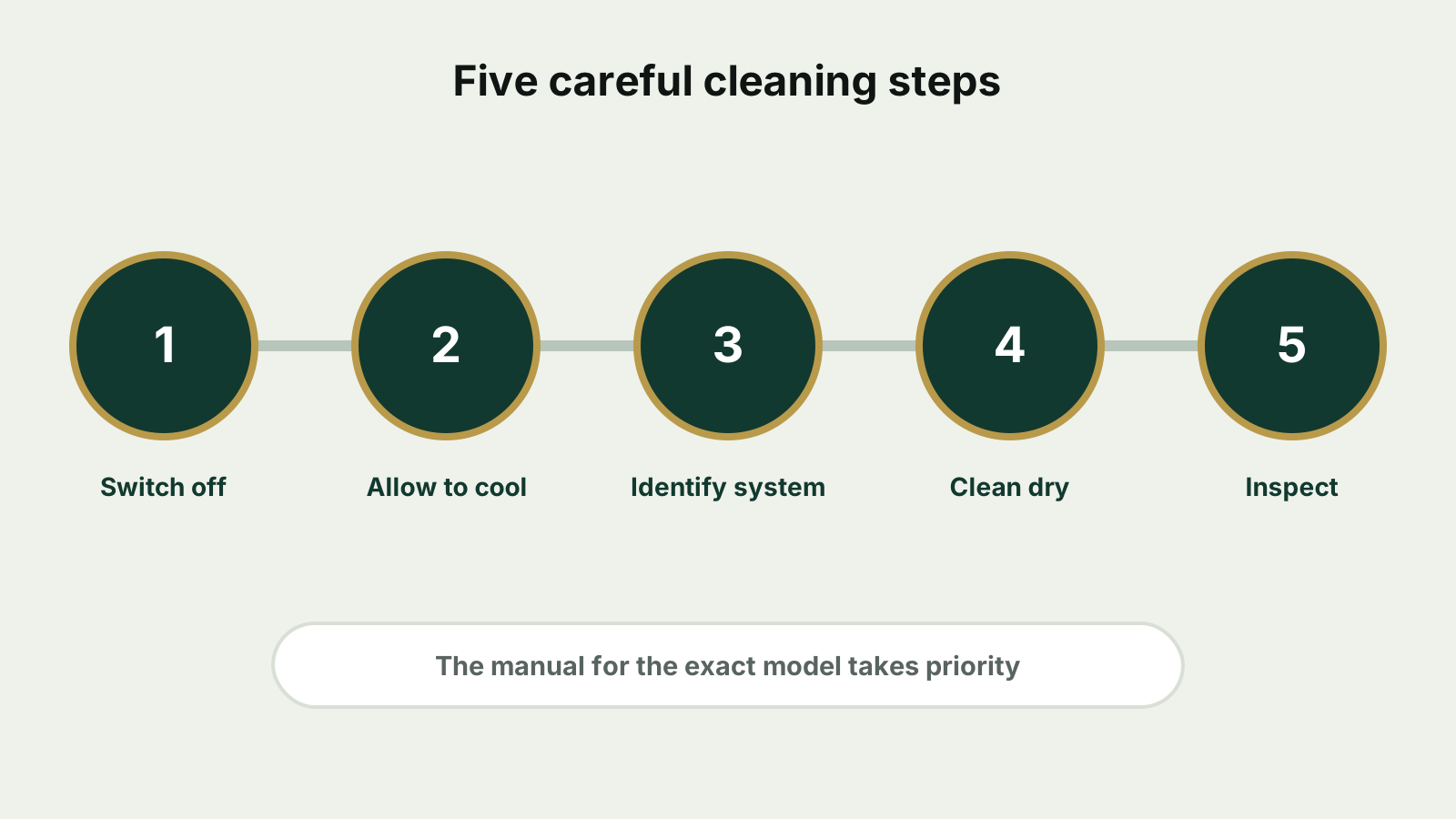
These steps provide general orientation. Instructions for the exact model always take priority.
Step 1: Identify the model and heating system
Check the model name on the device, its packaging or in an associated app. Generations from the same brand may have completely different internal designs.
Do not identify a device by colour or external shape alone.
Step 2: Switch off and allow to cool
End the session, switch the device off and disconnect the charging cable. Wait until the chamber and casing are completely cool.
A warm heating element may be more vulnerable and can cause injury if touched.
Step 3: Remove approved detachable parts
Remove only the parts the manual says can be removed, such as a cap, mouthpiece or outer cover.
Do not force a part. If it does not move as expected, check the manual before trying again.
Step 4: Remove loose residue
Hold the switched-off device with the opening facing down and tap it very gently against your palm, not a hard surface.
Use the intended tool for visible loose residue. Do not blow forcefully into the device because moisture can enter the interior.
Step 5: Clean the intended surfaces dry
Use a soft brush or a tool approved for the model. Insert it straight and without pressure.
Never apply sideways force to a heating blade or pin.
Step 6: Check contacts and charging port
Inspect the charging port and contact surfaces for dust or visible contamination. Disconnect the cable and keep these areas dry.
Do not pick material from the port with a needle. Contact the manufacturer or an authorized service if residue cannot be removed safely.
Step 7: Reassemble and inspect
Reassemble only the intended parts. Charge or switch on the device only when it is dry, undamaged and free from loose residue.
- Is the cover seated correctly?
- Is the chamber free from loose residue?
- Is the device fully dry?
- Are all components straight and undamaged?
- Is the charging port clear?
Common cleaning mistakes
Putting liquid into the chamber
Water, disinfectant and household cleaners can damage electronics, coatings and seals. Use liquid only on a removable surface when the manual explicitly allows it.
Scraping with metal objects
Needles, knives, tweezers and paper clips can cause scratches, short circuits or damage to the heating element.
Cleaning while the device is warm
Heat can make components more vulnerable and may cause injury.
Using excessive pressure
More pressure does not make stubborn residue safe to remove. Sideways force can be enough to damage a heating blade.
Using accessories intended for another device
A brush may be too wide, too stiff or too long. Use it only when it is suitable for the exact model.
Assuming an automatic cleaning mode exists
Not every model has an automatic cleaning cycle. Do not try button combinations copied from unrelated manuals.
How often should a heated tobacco device be cleaned?
There is no useful universal interval. The appropriate schedule depends on the design, use and manufacturer guidance.
Blade-free systems may collect less loose tobacco residue internally, but the casing, cap, openings and charging port still require inspection.
- Visible residue is present
- A stick is unusually difficult to insert or remove
- Airflow appears restricted
- The device shows a cleaning notification
- A manufacturer-specified usage count has been reached
Battery care and storage
Maintenance is not limited to the chamber. Use the intended charging cable and a suitable power supply where possible. Do not continue charging or using a device that is damaged, swollen or unusually hot.
Batteries and electrical devices must not be discarded with household waste. Use an appropriate collection or return point in accordance with local requirements.
- Store dry and protected from dust
- Keep away from direct sunlight and hot vehicles
- Avoid extreme cold
- Keep away from liquids and loose metal objects
Common problems after cleaning
| Problem | Possible cause | Reasonable next step |
|---|---|---|
| Device does not start | Empty battery or incorrectly fitted part | Check charge level and assembly |
| Stick is difficult to insert | Residue, incompatible stick or damaged chamber | Check model and compatibility; do not use force |
| Device does not charge | Dirty port, cable problem or battery fault | Inspect the dry port and test another suitable cable |
| Unusual smell | Residue or damaged component | Switch off and contact manufacturer support |
| Heating element appears bent | Mechanical damage | Do not bend it back or continue using the device |
| Device becomes unusually hot | Battery, charging or electronics fault | Switch off, disconnect power and stop using it |
Conclusion
Safe cleaning starts by identifying how the exact device is built. Heating blades, accessible chambers and enclosed induction systems require different treatment.
Allowing the device to cool, using only suitable tools and keeping liquid and metal objects away from the interior prevents many common forms of damage. Stop using a device with a bent component, unusual heat or a damaged battery and have it assessed appropriately.
Frequently asked questions
Can I clean a heated tobacco device with water?
Do not use water inside the device. A removable part may be cleaned with moisture only when the manual explicitly permits it, and it must be fully dry before reassembly.
Can I use cotton swabs?
Only if the manufacturer says they are suitable and they do not leave fibres. A wide or damp swab can push residue deeper into the chamber or touch a delicate component.
Can I use alcohol or disinfectant?
Not without explicit manufacturer approval. Solvents can affect plastics, adhesives, coatings or seals.
What should I do if a heating blade breaks?
Stop using the device. Do not replace or bend the blade yourself; contact the manufacturer or an authorized service.
Do blade-free systems need cleaning?
They may collect less loose tobacco residue internally, but the casing, cap, openings and charging port still need checks according to the manual.
How do I know which cleaning tool fits?
Use the model name and manual. Similar-looking devices can have different chamber dimensions and sensitive components.
Sources and data status
Checked on July 11, 2026. Modellabhängige Herstellerangaben können sich ändern.
- Manual for the exact device model Primary source for model-specific cleaning and safety steps; check before cleaning.
- WHO: Effects of tobacco on health Context that heated tobacco products are not risk-free.
- German Environment Agency: Waste electrical equipment Guidance on separate collection of waste electrical equipment.
- German Environment Agency: Batteries and rechargeable batteries Guidance on use and return of batteries.